Estimated reading time: 7 minutes
Key Takeaways
- Move-in/move-out documentation decides how security deposit disputes, wear-and-tear arguments, and damage claims actually end.
- A Matterport 3D tour captures every room, fixture, and appliance in 360 degrees — including every angle a photo checklist forgets.
- Scanning the same unit at move-in and move-out creates a side-by-side, time-stamped comparison of exactly what changed.
- Anyone — resident, owner, judge, or mediator — can verify the condition independently from any device with one share link.
- A typical unit scans in roughly 20–30 minutes, fast enough to fit inside a normal turn window.
Introduction: The Argument That Never Has to Happen
Ask any property manager what part of turnover week they dread most, and it’s rarely the painting or the punch list. It’s the conversation that starts with “That wall was already like that.” Security deposit disputes turn on one question — what condition was the unit actually in? — and the traditional answer, a move-in photo checklist, answers it poorly. Photos show the angles someone remembered to shoot, often prove nothing about scale, and are easy for either side to challenge.
A Matterport 3D tour changes the conversation entirely. In this guide, our Matterport 3D Tour Photographers explain how 3D documentation works for move-ins, move-outs, and portfolio-wide condition records — and how to build a turnover process that ends arguments before they start.
Table of Contents
- What Is Turnover Documentation?
- Why a 3D Tour Beats the Photo Checklist
- The Four-Step Turnover Documentation Workflow
- Beyond Deposits: Portfolios, Owners, and Courts
- How to Add 3D Documentation to Your Turn Process
- Frequently Asked Questions
- Final Takeaway
What Is Turnover Documentation?
Direct answer: Turnover documentation is the condition record captured when a resident moves in and again when they move out. Its purpose is neutral evidence: a dated, complete picture of the unit at each moment, so any change between the two can be attributed fairly — and any dispute can be resolved by looking instead of arguing.
Good turnover documentation has three properties traditional photo checklists struggle to deliver: completeness (every space, not the highlights), context (each image tied to its exact location), and neutrality (captured the same way for every unit, so no one can claim the process was selective). A Matterport 3D tour delivers all three in a single scan.
Why a 3D Tour Beats the Photo Checklist
Direct answer: A Matterport tour documents the whole unit in 360 degrees — walls, ceilings, closets, appliance interiors, and the spaces between them — with accurate dimensions and time-stamped imagery. Where a checklist proves what someone photographed, a tour proves what exists.
| Factor | Photo checklist | Matterport 3D tour |
|---|---|---|
| Coverage | Selected angles only | Every connected space, floor to ceiling |
| Condition context | Isolated snapshots | Each view tied to its exact spot |
| Verification | Trust the taker’s judgment | Independent — anyone can look |
| Comparison over time | Manual, side-by-side guessing | Dated captures compared in one place |
| Capture time per unit | 20–40 minutes of shooting | Roughly 20–30 minutes of scanning |
The verification row is the one that matters most in a dispute. When a resident can open the same tour your team used — from their phone, without special software — the question “are you sure?” answers itself.
Tip our Matterport 3D Tour Photographers recommend: scan from the same starting point at move-in and move-out. Consistent capture positions are what make the before-and-after comparison feel fair rather than selective.
The Four-Step Turnover Documentation Workflow
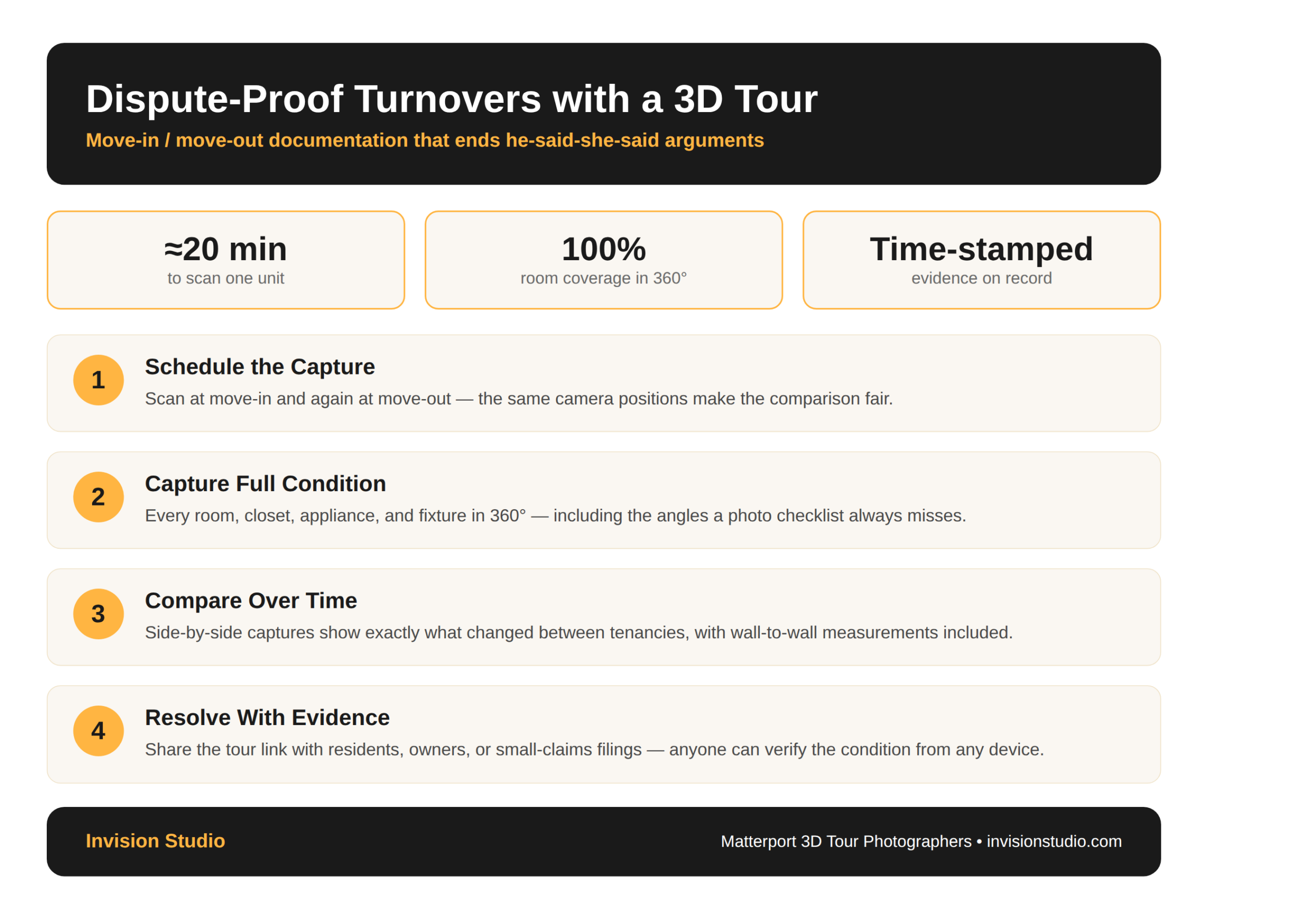
Building 3D documentation into your turn process takes less effort than most managers expect. The workflow looks like this:
- Schedule the capture. Scan at move-in and again at move-out — the tour becomes part of the lease file, not an afterthought.
- Capture full condition. Every room, closet, appliance, and fixture in 360°, including the corners a clipboard checklist always misses.
- Compare over time. Dated captures show exactly what changed between tenancies, with wall-to-wall measurements included.
- Resolve with evidence. Share the tour link with residents, owners, or small-claims filings — the record speaks for itself.
Tip our Matterport 3D Tour Photographers recommend: capture during the turn window while the unit is empty. An empty unit removes furniture ambiguity entirely — every surface in the tour is a surface someone is responsible for.
Beyond Deposits: Portfolios, Owners, and Courts
Deposit disputes are only the beginning. Portfolio managers scan units at scale to standardize condition records across a whole property, and compare those records against renovation plans and capital budgets. Owners who live out of state use tours to verify that their asset is being maintained without flying in. And when a dispute does reach mediation or small claims court, a neutral, time-stamped, independently viewable record carries weight that handwritten notes and phone photos cannot match.
The same capture also powers marketing: the tour shot for documentation at turnover can be refreshed and reused when the unit goes back on the market — one capture visit serving compliance and leasing at once.
How to Add 3D Documentation to Your Turn Process
Start with the units that generate the most disputes — high-turnover buildings, student housing, and short-term rentals see the fastest payback. Most single-family units scan in roughly 20 to 30 minutes, and the finished tour is typically delivered within days, so the process fits inside a standard turn window without delaying leasing.
For portfolios, consistency matters more than speed: our Matterport 3D Tour Photographers capture every unit to the same standard, so records stay comparable across properties, managers, and years.
Frequently Asked Questions
Can a Matterport 3D tour be used for move-in and move-out documentation?
Yes. A Matterport 3D tour records every room, fixture, and appliance in 360 degrees with time-stamped imagery and accurate dimensions, creating neutral condition evidence both residents and property owners can review.
How long does it take to scan a rental unit for turnover documentation?
Most single-family units scan in roughly 20 to 30 minutes, and the finished tour is typically delivered within days — fast enough to fit inside a standard turn window.
Is a 3D tour more defensible than a move-in photo checklist?
Generally yes. A photo checklist only shows the angles someone remembered to shoot; a 3D tour captures every connected space from floor to ceiling, and viewers can verify it themselves from any device.
Do Matterport tours work for single-family rentals and multifamily portfolios alike?
Yes. Owners use tours for individual units, while portfolio managers scan at scale to standardize condition records across properties and compare captures over time.
Final Takeaway
Deposit disputes are won by whoever has better evidence — and for about the cost of a coffee run, you can be the side with a walkable, time-stamped 3D record of every unit. Whether you manage ten doors or ten thousand, Invision Studio’s Matterport 3D Tour Photographers can build documentation into your turnover process from the very next vacancy. Get a quote before your next move-out week.